Language Upgrades
Last updated: September 25, 2026
Superhost
Superhost functionality allows your AI host to detect when callers speak one of our 97 supported languages for Superhost customers. There is nothing to turn on, if you are on Superhost, the feature is supported!
Automatic Language Detection: Accurately detects the language the caller is speaking in and responds accordingly.
Natural Voice: Uses a high-quality synthetic voice that accounts for real conversation nuances such as barge-in.
Full Host Functionality: Supports all standard tasks like booking, changing, and canceling reservations. You can think of it like a “translation” of your existing AI host; all of your content is covered.
Interested in upgrading to Superhost? Reach out to support@slang.ai or your representative to go over options for language support.
Bilingual Support - Concierge Model
Automatic Language Detection: Accurately detects if the caller is speaking in English or Spanish.
Greeting “nudge”: To your standard greeting, adds a sentence to help callers know the language is supported.
Hi, thanks for calling Slang Cafe! Just so you know, you’re speaking on a recorded line. También puede hablarme en español. How can I help?
(The “nudge” says “You can also speak to me in Spanish.”)
Full Host Functionality: Supports all standard tasks like booking, changing, and canceling reservations. You can think of it like a “translation” of your existing AI host; all of your content is covered.
How do I turn it on?
Navigate to the Settings page in your Slang dashboard.
Find the Languages section. The default position is OFF, and the default state is English only.

Click the toggle. When you see the confirmation pop-up, pick Confirm to save your changes.
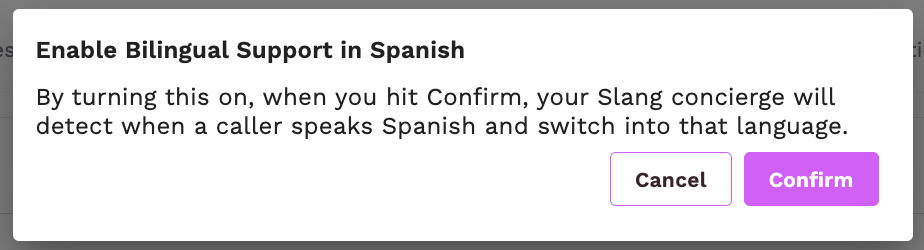
When the feature is turned ON, the toggle is blue, and it will read Bilingual (English and Spanish)

How will I know it’s working?
When you call your AI Host, you should hear the Spanish “nudge” in the greeting.
On your Insights → Conversations page, you will see a Languages section at the bottom that shows you what percentage of calls are in English versus Spanish.
How do I turn it off?
Navigate to the Settings page in your Slang dashboard.
Find the Languages section. The default position is OFF, and the default state is English only.
Click the toggle to return it to the gray OFF position.
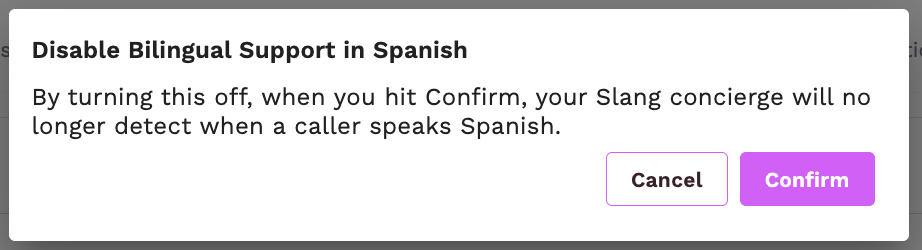
When you see the confirmation pop-up, pick Confirm to save your changes.
More questions?
Contact your Account Manager to discuss upgrading your Slang tier or purchasing Bilingual Support A la carte. Feel free to reach out to support@slang.ai for additional questions.