Superhost: Conversation Outcomes Chart
Last updated: October 2, 2026
We've released a new visualization available on Superhost showing the outcome of every call that your Slang concierge conducts, and highlighting important data like transfer and containment rates.
The new chart shows the complete path each call takes, including:
How calls started, and if guests engaged with the AI
How many calls were fully resolved (contained)
The reason why a transfer was initiated
After a transfer, how many calls were answered or missed by your team
Because the chart connects these stages together, you can now see the nuance of conversational pathways — like a call where the guest engaged with the AI first and still ended up being answered by staff.
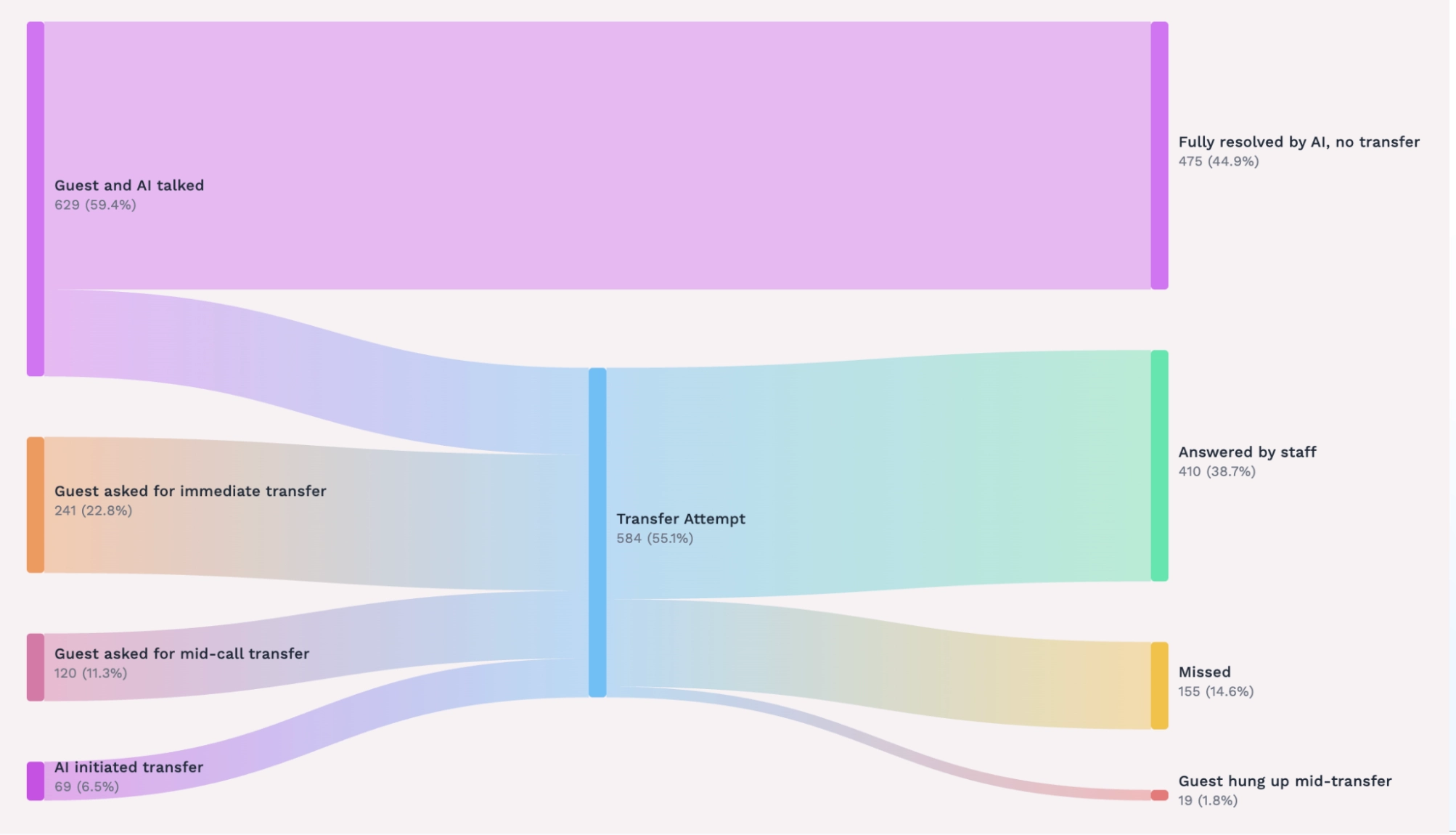
How to Read the Chart
Label | What It Means |
|---|---|
Guest and AI talked | The guest and Superhost engaged in some back-and-forth conversation, and Superhost handled the call as it was trained to do. |
AI transferred to staff per your policy | The guest asked about a topic that is configured to forward in your Slang dashboard, so Superhost transferred the call per your policy. |
Guest asked for immediate transfer | At the beginning of the call, the guest asked to be transferred to staff, skipping past any interaction with Superhost. |
Guest asked for mid-call transfer | The guest engaged with Superhost first, then explicitly asked to speak to staff in the middle of the conversation. |
AI initiated transfer | Superhost detected a need for human intervention that resulted in a transfer, such as encountering a technical issue. |
Fully resolved by AI, no transfer | Superhost handled the call start to finish, with no need to initiate a transfer. |
Answered by staff | Staff successfully picked up the call and spoke with the guest. |
Missed | Superhost transferred the call, but staff didn't answer. |
Guest hung up mid-transfer | The transfer was abandoned because the guest hung up before connecting, or the number was unavailable. |
Outside of transfer hours | The transfer phone number has limited hours through Scheduled Support Hours, so the number wasn't available to send a transfer through. |
Other Insights Updates
Coming soon:
Event Leads
Call Topics
During vs After Hours
Transferred Calls by Hour
As part of this update, some legacy metrics are being retired in favor of more useful ones.
A Note on Historical Data
If you’ve been a Slang customer for a few years, you might remember a previous version of this information. The prior Conversation Breakdown donut was a simple breakdown that didn't always capture the full picture — for example, it couldn't show a call that involved both engagement and a transfer.
We developed this chart with lots of partnership and feedback from customers, to add value and transparency to your Slang experience. If you'd like to talk through how to use the chart, we're happy to help.
For more information on the latest version of Slang, contact your account manager or email support@slang.ai.