SevenRooms FAQs
Last updated: September 2, 2026
What can the integration do for my guests?
The Slang AI integration with SevenRooms can book standard reservations without a payment requirement or cancellation policy through a simple Slang phone call.
Does Slang work with SevenRooms Nightlife?
No. The Nightlife product uses event request forms rather than bookable tables — Slang cannot process availability or complete reservations in this configuration. If you're unsure which product your venue uses, reach out to us at support@slang.ai.
Does Slang work with Superhost?
No. The SevenRooms integration is not compatible with Superhost.
What is the Caller Experience?
If a caller asks to make a reservation, your Slang Concierge will collect the essential details: date, time, and party size. We’ll check your books for availability via the SevenRooms API and let the caller know what’s available.
We can offer one or two alternative seating times if the requested time is not available.
Once we collect the name for the reservation, we’ll submit reservation details to your venue and allow the SevenRooms Auto-assign algorithm to recommend a table placement.
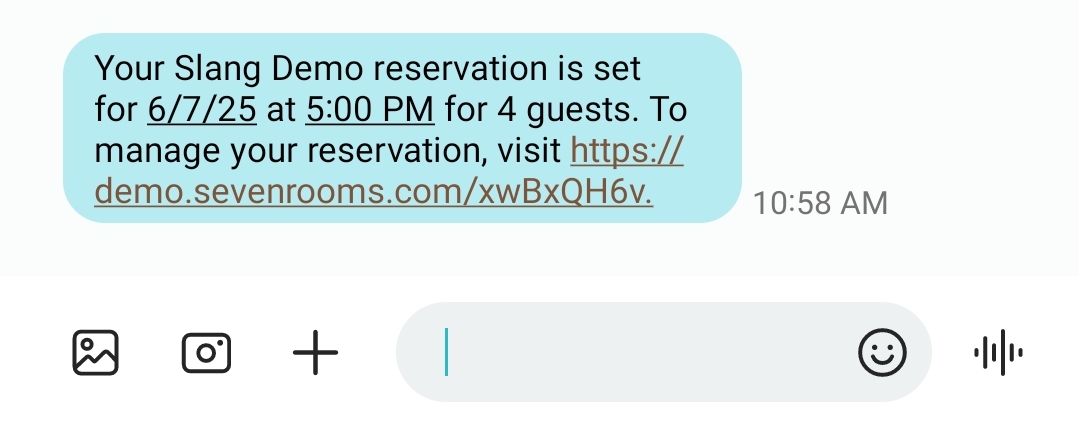
Confirmation text messages will come from SevenRooms at the time of booking.
What happens if a guest wants to make a change to a reservation?
The Concierge will default to whatever is set in the Reservation topic section of the Slang Concierge for Change Reservation and Cancel Reservation, whether this may be reaching out to staff via web form, email or forwarding the call.
What if the booking requested requires a Credit Card?
All bookings requiring a credit card hold or deposit are currently not bookable through the integration, and these calls will be escalated to your staff.
As such, if your venue requires a credit card hold or deposit for every booking, this integration is not a good fit for your operations at this time.
I have a Paylink integration through SevenRooms, can Slang book reservations that require a Credit Card?
Unfortunately, Paylink requires a valid email address and the Slang product currently communicates via phone and SMS, so any reservation that requires a credit card can't be booked via this integration.
What if a repeat diner books with Slang?
If a guest books via Slang with a Name + Phone Number combination that exists already, the reservation will be made using the existing diner record. At this time Slang submits all diner names in lowercase, and it appears that SevenRooms may be writing the new lowercase name to the profile. However, historical data is preserved.
Exception: If “Michael” is in your guest book and he spells his name “M-I-K-E” on a Slang call, you may see a new guest in your guestbook.
How will customers receive confirmation?
All booking confirmations are sent by SevenRooms via SMS after a reservation is made. If the caller is a repeat diner with an email address saved to their guest info, they may receive an email as well, depending on your Venue Settings. To view your Venue Settings,
When logged into SevenRooms, click on Settings on the bottom of the left-side navigation bar.
Click on Venue Settings.
Navigate to the Guest Email / SMS tab to view your current notification settings.
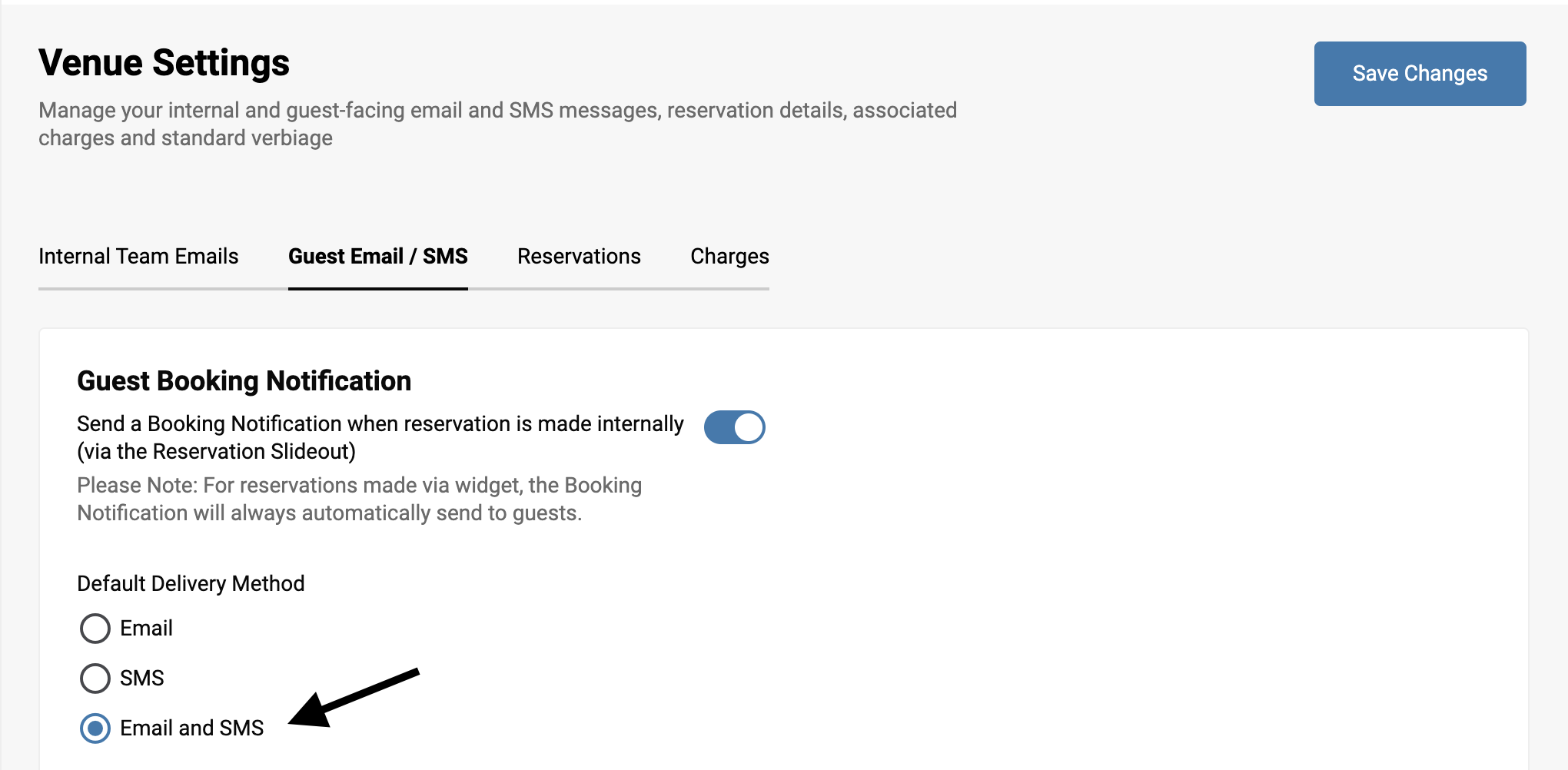
If you save “Email” or “Email and SMS” diners may receive both.
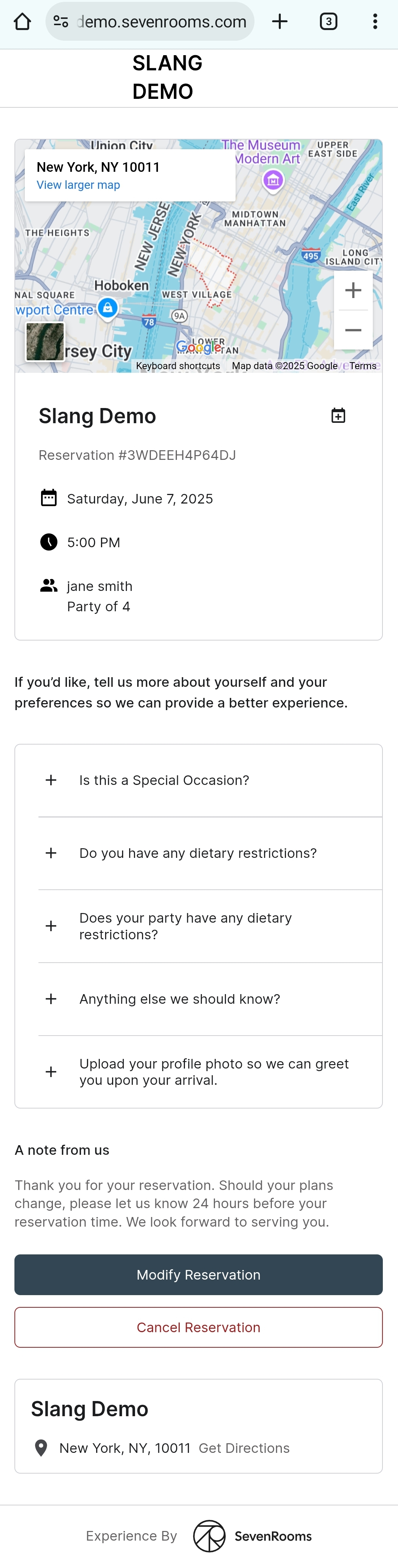
The text from SevenRooms has a unique link to manage their booking when the reservation has been made, with the page linked showing venue details and reservation management options:
Does the integration cost anything?
The SevenRooms integration is available to Slang customers who are paying for one of our integrations billing packages, either Core or Premium.
Separate costs may be incurred when requesting API keys from SevenRooms. Please talk to your SevenRooms account manager if you have any questions about your SevenRooms account status or billing.
What Slang information gets pushed into SevenRooms? How quickly does this get populated in the SevenRooms tablet interface?
Slang bookings will populate a reservation with a first and last name, phone number, and optionally “Special Notes” from the caller within seconds of the Slang call.
Is the integration bidirectional, or only one way?
Slang will push new bookings into SevenRooms. We cannot look up guests by phone number or extract any data from SevenRooms.
What reporting is available on the Slang dashboard? What about the SevenRooms side?
Slang: Reservations will show on the Reservations Insights page of the Slang dashboard.
SevenRooms: Attribution is indicated by reservations booked by Slang Audience. To start exploring Slang's bookings through the integration, login into your account on a web browser.
Click on "Reporting" on the left navigation bar.
Select "Booked by"
Filter "Booked by" using the name “Slang Audience”
You can click "+" to compare other channels side by side with Slang!
Any other Reporting dashboards in SevenRooms will carry the same attribution pattern.
Are there any other features I have access to?
Our Cross-Sell Reservations feature is compatible with the SevenRooms integration, and is available for Premium Subscriptions with Slang.
Our Pause Same-Day Reservations feature allows you to stop the flow of reservations from Slang calls if you have a buyout or if you get too busy and don't want bookings to interrupt your host's wait list management.
How do I disconnect the integration?
If you ever need to disconnect your SevenRooms integration with Slang, head to the Marketplace on your Slang dashboard.
Log in to ilove.slang.ai
Click on Marketplace on the left-side navigation.
On the SevenRooms tile, click Manage
A drawer will open and will show a button that says Disconnect