Exporting Diner Info from OpenTable
Last updated: October 1, 2025
Exporting a CSV from OpenTable and send it to Slang!
Introduction
Currently, callers asking to book a table will be asked to spell their name out on a call to your Slang concierge. On the backend, through OpenTable, if the first and last name are a match to a phone number in your guestbook, the reservation made will be under that historical record.
However, if “Michael” spells their name “Mikey” on a Slang call, we will create a new diner profile that won’t have any of your guest notes or tags attached. Not great when you want to recognize repeated guests or VIPs!
Why should I do this?
We can enhance the caller experience and make the reservation process faster by exporting your guest book information and importing it to your Slang concierge.
With your guest data saved to your Slang concierge, if we detect that the caller’s phone number is associated with a diner in your books, we will skip asking the diner to spell their name, and use the diner name from your records. This will streamline the booking experience for your regular guests, and ensure that your hosts know their preferences and history with your restaurant!
Ready to make the calling experience even better for your guests?
Here’s how:
Log into your OpenTable account at guestcenter.opentable.com
Navigate to the Reporting tab using the navigation menu.
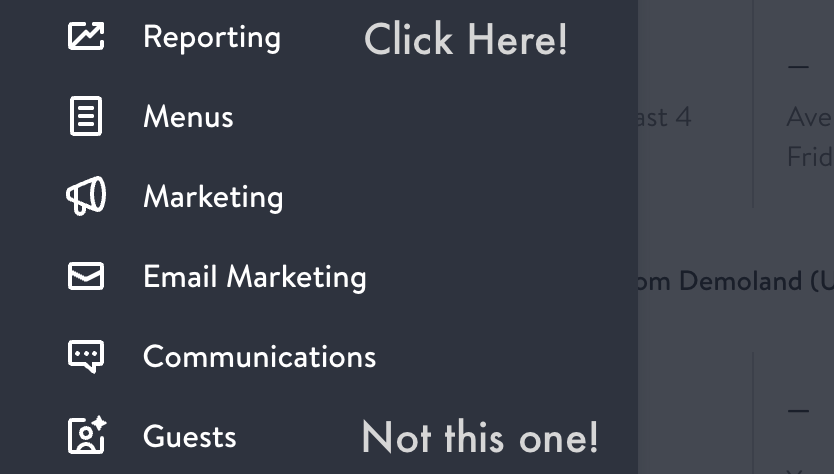
On the left-hand side in Reporting, scroll down to the Reporting section labeled Guests, and select Guest Export.
In the drop-down menu you should see Select Guestbook and choose All Guest Profiles.
Click on Download.
You will get an email from OpenTable when the download is ready. Please follow the instructions in this email to download your data as soon as possible, it will expire in 48 hours.
Rename the file with your restaurant name and location (see below).
Email the renamed export to support@slang.ai so we can upload it to your Slang Concierge.
Please note: Guest Manager exports are in a data format incompatible with our processes at this time. Following these instructions will ensure swift action by our team.
Format recommendation: RestaurantGroup.LocationName.csv
Example: KrustyKrab.BikiniBottom.csv
Have Questions?
Need more assistance or have a question? Shoot us an email at support@slang.ai. Our dedicated support team is available to help with any questions you might have, so don't hesitate to reach out!