Reservation Booking Window
Last updated: December 17, 2025
Some operators want to restrict Slang reservations to a certain window of time, here's how!
Our reservation integrations have visibility into your tables, but not every setting. OpenTable, for instance, gives us the ability to book In-house reservations just like your staff -- but staff don't have to follow the same rules as online bookings.
Our Reservation Booking Window feature will help align your online inventory settings with Slang's actions, so that you aren't surprised by a reservation months in advance.
Where do I find it?
On the Settings Page at ilove.slang.ai you’ll see a sub-heading for Reservations:

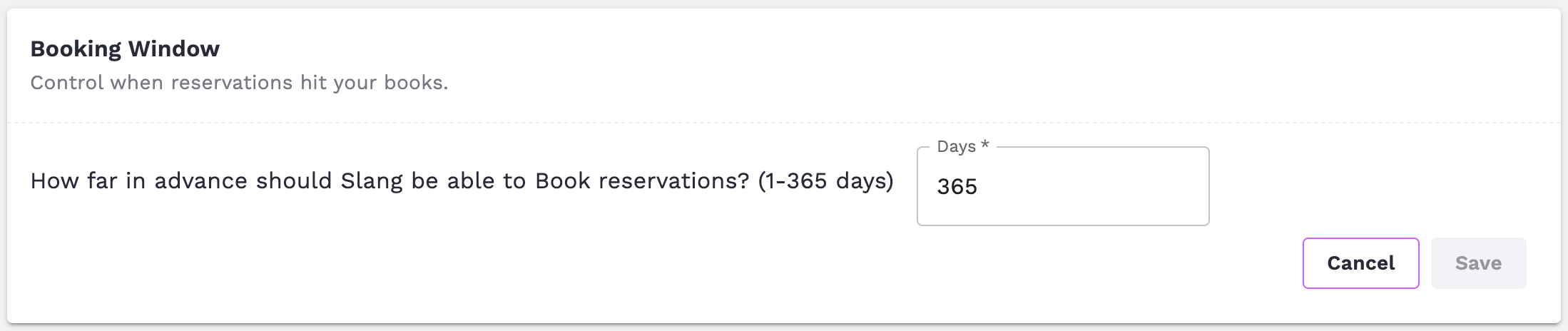
By clicking here or scrolling down, you'll find the Booking Window widget:
How do I use it?
If you want to set a Booking Window for Slang:
Enter a number of days between 1 and 365.
Hit Save!
Note: This is not synced with your Reservations Management platform at this time. If you make an update in OpenTable, for example, you will also need to update Slang's Settings page.
What's the caller experience?
When a caller gives Slang the details of their desired reservation, we'll check to see if the desired date is within your Booking Window.
If the request is too far into the future, the caller will hear:
Unfortunately, we don't take reservations that far in advance. You can call back on a later date, or, if you'd like, I can text you a link to our online booking options. Would you like that text?
Have Questions?
Need more assistance or have a question? Shoot us an email at support@slang.ai. Our dedicated support team is available to help with any questions you might have, so don't hesitate to reach out!